- Full-screen stopwatch and count-down timer
- - By Paul Beaufait
- Send files up to 100 MB. Get them stored online for 7 days. Recommended by Zamzar.
- - By Gladys Baya
- ... [An unrelated bookmark slipped through Diigo; it's gone from the group site, so I've removed it here. PB, 2011.07.17]
Saturday, July 16, 2011
LWCBookmarks (weekly)


Saturday, July 09, 2011
LWCBookmarks (weekly)
The KYVL for Kids Research Portal - How to do research Home Base
Teaching with Technology in the Middle: Revisioned Student Blogging
Nik's Learning Technology Blog: Crowdsourcing Knowledge with Students
Peachey recommends "a very simple brainstorming and voting website called tricider ... that it is incredibly quick and simple to use" (¶1, retrieved 2011.07.05).
- Peachey recommends "a very simple brainstorming and voting website called tricider ... that it is incredibly quick and simple to use" (¶1, retrieved 2011.07.05). - By Paul Beaufait
111 EdTech Resources You May Have Missed–Treasure Chest July 3, 2011 | Tech the Plunge
Nice compendium of web-based learning resources from Thomas
- - By andrew bendelow
Posted from Diigo. The rest of LearningwithComputers group favorite links are here.
Saturday, July 02, 2011
LWCBookmarks (weekly)
WebList - The place to find the best web lists on the web
- Create a list you can easily share with your friends using a single URL.
A list can include anything from a collection of web pages, images, documents, videos and
more. Still have questions?
YouTube - ISTE 2011 Opening Keynote: Dr. John Medina (full-length)
ISTE keynote looks to the next generation of teaching software that "reads" students
- - By andrew bendelow
Abeywickrama, Priyanvada. (2011). The validity of nonnative speaker input in listening comprehension tests. [TESOL] Applied Linguistics Interest Section Newsletter (June 2011).
- - By Paul Beaufait
- Test performance data in this study suggest that nonnative
varieties of English can be used as listening test input while attitude
questionnaire results go counter. - These findings support most of the previous research in
this area. - Until research shows that the use of nonnative English as input
is irrelevant to the construct of listening, we may be unable to use
such input in testing, especially in high-stakes tests such as TOEFL and
IELTS. - As nonnative speech gains recognition among language users
and test takers, we hope the attitudes and perceptions toward the use of
these varieties of English will change.
Posted from Diigo. The rest of LearningwithComputers group favorite links are here.
Saturday, June 25, 2011
LWCBookmarks (weekly)
ManyBooks.net - Ad-free eBooks for your iPad, smartphone, or eBook reader
WiredKids, the ultimate online safety project for kids and teens!
HotChalk Learning Management System Connecting Teachers, Students and Parents
Education Eye - Mapping Innovations
Education Eye is a free, engaging and easy-to-use online space that gives access to a wide range of exciting, relevant and useful innovations which are selected from the best of the web and updated daily.
The Eye provides a way to discover, explore and share new ideas. It maps hundreds of the top educational websites, forums and practitioner case studies. With additional features like saving your own favourite innovations, Futurelab's favourites, customisable email digests and a downloadable widget version, it's invaluable for exploring educational innovations.- - By Barbara Moose
Houghton Mifflin Harcourt - Global Education Challenge - Idea Display
H Mifflin - Globl Ed Chllge - Dorit' Eilon's goal-setting program = perfect for individ, networked learning http://diigo.com/0hy1x #edtech
- - By andrew bendelow
our educational system practices have a tendency to foster dependence, passivity and a "tell me what to do" attitude.
Effective learning is that students are in charge of their own learning and progress. A growing body of research indicates that when students are working on goals they themselves have set, they are more motivated and efficient, and they achieve more than they do when working on goals that have been set by the teacher.
..should teachers and students really be interacting with each other in this way? With proper adherence to respectful and professional interaction, and with the understanding that our personal and professional cyber presence cannot really be altogether separate and based on different standards...yes! Yes, we should! Who better to teach students how to develop online identities aligned with the same character education standards modeled in “real” life? Who better to guide them on what is acceptable interaction? I believe this is a wonderful opportunity for mentoring young students, and for the most part, we are currently opting out.
- - By andrew bendelow
- .should teachers and students really be interacting with each other in this way? With proper adherence to respectful and professional interaction, and with the understanding that our personal and professional cyber presence cannot really be altogether separate and based on different standards...yes! Yes, we should! Who better to teach students how to develop online identities aligned with the same character education standards modeled in “real” life? Who better to guide them on what is acceptable interaction? I believe this is a wonderful opportunity for mentoring young students, and for the most part, we are currently opting out.
Posted from Diigo. The rest of LearningwithComputers group favorite links are here.
Saturday, June 18, 2011
LWCBookmarks (weekly)
- Resources to help you teach possessive nouns.
- - By Cara Whitehead
- ... [commercial promotional listing removed, 2011.06.20, PB]
Saturday, June 11, 2011
LWCBookmarks (weekly)
- HootCourses are held online, using Twitter and Facebook as a virtual classroom space.
Digital Life: Today & Tomorrow on Vimeo
"Digital Life: Today & Tomorrow"
- - By John Evans
Posted from Diigo. The rest of LearningwithComputers group favorite links are here.
Saturday, June 04, 2011
LWCBookmarks (weekly)
"Online programs for recording, uploading, mixing, and interacting" (tagline), found thanks to Carla Arena's micro-review of one of the tools: Audio Delivery Made Super Simple (Collablogatorium, May 23, 2011).
- "Online programs for recording, uploading, mixing, and interacting" (tagline), found thanks to Carla Arena's micro-review of one of the tools: Audio Delivery Made Super Simple (Collablogatorium, May 23, 2011). - By Paul Beaufait
Mobile Perspectives: On teaching Mobile Literacy (EDUCAUSE Review) | EDUCAUSE
News: Tablets, Yes; E-Texts, Maybe - Inside Higher Ed
"Claims that tablets will revolutionize the learning experience often go hand-in-hand with a push for more digital textbooks, but the Pearson survey showed that students don't often link the two. While most students perceived an educational value to tablets, only 35 percent said they preferred digital editions to print editions, and only about half of those preferred tablets to other digital devices" (Keving Kiley, 2011.05.25, ¶8, retrieved 2011.05.30).
- - By Paul Beaufait
A practical guide to creating learning scenarios: part 2 | Onlignment
In part 1 of this series, we looked at what a learning scenario is, its basic structure, capabilities and applications. We move on now to look in more detail at the steps involved in creating simple scenarios to support learners in understanding the principles underlying everyday problem-solving and decision
Posted from Diigo. The rest of LearningwithComputers group favorite links are here.
Tuesday, April 05, 2011
Want to Remember Everything You'll Ever Learn? Surrender to This Algorithm
Want to Remember Everything You'll Ever Learn? Surrender to This Algorithm (Wired Magazine: 16.05)
. . .
Long-term memory, the Bjorks said, can be characterized by two components, which they named retrieval strength and storage strength. Retrieval strength measures how likely you are to recall something right now, how close it is to the surface of your mind. Storage strength measures how deeply the memory is rooted. . . .
. . . [L]aws of memory wreak havoc on students and teachers. One of the problems is that the amount of storage strength you gain from practice is inversely correlated with the current retrieval strength. In other words, the harder you have to work to get the right answer, the more the answer is sealed in memory. Precisely those things that seem to signal we're learning well — easy performance on drills, fluency during a lesson, even the subjective feeling that we know something — are misleading when it comes to predicting whether we will remember it in the future. . . .
(Gary Wolf, The problem of forgetting, ¶¶6-7, 04.21.08).
Friday, July 09, 2010
New Look and Old Look
This post, the first since a template update necessary to enable modifications such as the addition of a Recent Comments feed, displays the old look in a series of screenshots. These pictures show the previous home page layout and sidebar elements. Hopefully, as time permits, one or more of us will be able to restore other page elements, such as the LwC logo, to make the new look into a fair facsimile of the old one.


Wednesday, October 15, 2008
Personal Start Pages
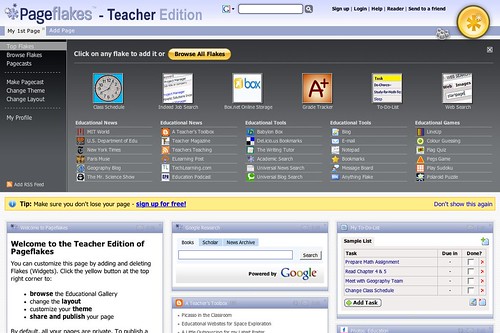
Welcome to personal start pages for LwC! Over the next few weeks, we'll be exploring personal start or home pages, especially Pageflakes. With Pageflakes and similar online tools, you'll be able to create your own personal start page, bringing everything that you are interested in to one place! This makes it easy to see when your favorite blogs and sites have been updated, what your friends are saying on Twitter, or even what the weather is like! In order to get started, we'll review the very basics of RSS and then we'll get started creating our own personal, class, and professional pages using Pageflakes. As you'll see, you can easily customize your Pageflake to suit your interests and needs. Finally, in addition to Pageflakes, try out alternate tools, such as Netvibes and iGoogle, or even Protopage.
Week One Tasks: Personal Start Page Basics
1. Watch Nik Peachey's training video and/or read his post about start pages
2. Check out options for creating your personal start or home page, including Pageflakes, Netvibes, iGoogle, Protopage;
3. LwC members who already have a Pageflakes or start page, please share your URL with the group, so others can peruse sample pages from LwCers who already using them
Optional: If you need more information about RSS, please see Common Craft RSS in Plain English video
Questions: Please post a comment here on our LwC Blog.
How would RSS be useful for educators?
What is a Start or Home Page and how would it help you?
What are your initial impressions of Pageflakes?
Which option for creating your homepage will you try and why?
Other comments or questions?
Monday, March 24, 2008
Who are you online?
The question of anonymity on the Web seems to me a heated and
never-ending debate. Should we reveal our true identities online? Or
should we hide who we truly are and go around cyberspace as
anonymously as possible?
In favour of the first position, I've heard:
- People like real names. It's much easier to trust content posted by someone you can track back in time, and this helps you get readers more realistic perception of the poster.
- The more background information you give about yourself, the less likely your readers are to misinterpret your words.
- For educators, addressing a group without introducing themselves seems unthinkable (at least in my culture). Conversely, I would personally refuse to teach someone who refused to identify themselves. Why would I do otherwise online?
Against revealing your true identity online, it's been said that:
- The Web is the place for anonymity by excellence. (I do not support this view, I actually believe this idea goes against true communication)
- You cannot control who has access to your information online. Therefore, it's wise to protect your privacy. (I do agree with this view to a point, though I guess it's time we started questioning how "private" our identity is even before we go online when so many sites can post about us!).
A solution reconciling all arguments (except perhaps the unlimited right to anonymity) could be the systematic use of aliases and an avatar instead of a photo.
In conclusion, I can certainly understand somebody's decision to use different aliases to post about their professional life from family news. What I find hard to deal with is somebody who asks for support from a community I belong to, and at the same time refuses to open any doors to collaboration with me by not revealing who they are.
In this video clip, Dick Clarence discusses Identity 2.0. Enjoy!
Can you add any arguments to the ones mentioned above? Would you like to share your views on our online identities? Post a comment below! (or write a post in your own blogs and trackback here).
Saturday, September 29, 2007
Speaking Activities
This month's focus is on sites that promote speaking activities. You can find hundreds of links that relate to this topic on my English For Beginners page under Audio Conversations and on my English Themes for Beginners/Early Intermediate page under Conversations.
However, since the best way to encourage speaking in English is by having students.....speak, I'd really like to highlight the hundreds of links I have on my Examples of Student Work page. There, you can find countless activities where students have to actively participate in speaking instead of passively listening. The best of this category include:
* Ones where students sing karaoke and record their masterpieces. Two of these site are Sims On Stage (formerly known as Singshot) and KSolo.
* Links where students record messages that virtual alter-egos of themselves speak, such as Voki.
* And, of course, there's Voicethread, which allows students to create narrated slideshows.
Larry Ferlazzo
However, since the best way to encourage speaking in English is by having students.....speak, I'd really like to highlight the hundreds of links I have on my Examples of Student Work page. There, you can find countless activities where students have to actively participate in speaking instead of passively listening. The best of this category include:
* Ones where students sing karaoke and record their masterpieces. Two of these site are Sims On Stage (formerly known as Singshot) and KSolo.
* Links where students record messages that virtual alter-egos of themselves speak, such as Voki.
* And, of course, there's Voicethread, which allows students to create narrated slideshows.
Larry Ferlazzo
Saturday, August 25, 2007
Reading Treasures Show

This is a wonderful recording of an Alado session which took place some time in August 2007, called "Reading Treasures Show". Teachers from various countries talk about what they do to create reading opportunities for their students. I'd like to congratulate all of them on this wonderful work!
CLICK HERE TO LISTEN TO THEIR DISCUSSION
Friday, August 03, 2007
Developing Reading Skills

This month in Learning with computers we'll be sharing links to develop reading in English.
http://www.bl.uk/onlinegallery/ttp/ttpbooks.html (Gladys's suggestion)(Enchanting!)
Some of Larry's links:
http://professorgarfield.org/pgf_ReadingRing.html Put cartoon strips in order and answer comprehension questions. (Great!)
http://reading.ecb.org/student/index.html It's not fully ready yet but focusses on reading strategies.
http://www.woodlands-junior.kent.sch.uk/interactive/onlinestory.htm#talk a collection of online reading stories.
http://www.harcourtschool.com/activity/book_buddy/gr1_4lily/skill_ae.html Drawing conclusions. (simple but interesting)
http://www.dfes.gov.uk/readwriteplus/learning_material/portal/predicting-meaning_lit_e2/m01/t08/index.htm Predicting meaning
http://www.dfes.gov.uk/readwriteplus/learning_material/portal/checking-the-meaning-of-words_lit_e3/m01/t24/index.htm Using a dictionary
http://www.studyzone.org/testprep/ela4/i/enviroprintp.cfm Reading Street signs
http://www.learnenglish.org.uk/stories_poems_archive_frame.html a collection of stories from BBC
http://www.britishcouncil.org/learnenglish-central-stories-archive.htm collection of stories
http://www.britishcouncil.org/kids-stories.htm stories for kids
http://www.stories.org.br/ the same TRUE story in English and portuguese side by side.
http://www.indianchild.com/short_stories.htm SHORT stories.
http://www.englishclub.com/reading/short-stories.htm short stories graded by level.
These ones I found in Libardo´s blog:
http://www.zapdramatic.com/mod1.htm You can read, listen and watch a very exciting story. You are even asked to interact with the events. SUPERB!
http://www.3xplus.com/pasnet01/scrpasnet01US.htm another interactive DETECTIVE story.
http://www.kizclub.com/Sbody.html Different stories to read and listen, 3 different levels.
http://www.nwlg.org/pages/resources/owl/OWL3Book1/Book01/default.htm this story explains about opposites in an interesting way.
http://www.go4english.com/ffk/archive.php?lang=en&cid=10041002 Great stories.
http://americanhistory.si.edu/onthemove/games/game2/game2.html The time machine. I had great fun travelling in time!
Thursday, August 02, 2007
Using Computers To Teach Reading
I wanted to share a few of the favorite sites I use to help my English Language Learner students develop their reading skills.
They are basically divided into two categories -- sites that explicitly teach reading strategies and test comprehension, and sites that offer fiction or non-fiction stories that have text with audio and visual support.
For the former, my favorites include:
* Reading Ring, an activity on the excellent Professor Garfield site. In this game, players have to correctly unscramble a comic strip and then answer questions about it.
* Into The Book is a work-in-progress that will eventually have interactive exercises helping students learn multiple reading strategies. Right now only the one of "visualizing" is complete. It's extraordinarily well-done.
* There are two sites that have multiple activities to help teach reading strategies. I have links to many of these specific activities, and the ones I mentioned earlier, under the English For Beginners -- Reading section of my website. However, it's worth checking-out the two sites that host them all, too. They are Study Zone Test Prep Center of New York and the United Kingdom's Embedded Learning Portal.
I have links to thousands of online stories that offer text with audio and visual support on the English For Beginners- Stories and English For Beginners Non-Fiction sections of my website. My favorite, though, is:
* Woodlands Junior School in the United Kingdom. They have many of the same stories I have on my pages. However, there's is much better-designed and attractive.
Finally, I'd encourage people to read here about my school's use of computers to teach reading to English Language Learners, which was awarded the 2007 International Reading Association Grand Prize Presidential Award for Reading and Technology.
Larry Ferlazzo
They are basically divided into two categories -- sites that explicitly teach reading strategies and test comprehension, and sites that offer fiction or non-fiction stories that have text with audio and visual support.
For the former, my favorites include:
* Reading Ring, an activity on the excellent Professor Garfield site. In this game, players have to correctly unscramble a comic strip and then answer questions about it.
* Into The Book is a work-in-progress that will eventually have interactive exercises helping students learn multiple reading strategies. Right now only the one of "visualizing" is complete. It's extraordinarily well-done.
* There are two sites that have multiple activities to help teach reading strategies. I have links to many of these specific activities, and the ones I mentioned earlier, under the English For Beginners -- Reading section of my website. However, it's worth checking-out the two sites that host them all, too. They are Study Zone Test Prep Center of New York and the United Kingdom's Embedded Learning Portal.
I have links to thousands of online stories that offer text with audio and visual support on the English For Beginners- Stories and English For Beginners Non-Fiction sections of my website. My favorite, though, is:
* Woodlands Junior School in the United Kingdom. They have many of the same stories I have on my pages. However, there's is much better-designed and attractive.
Finally, I'd encourage people to read here about my school's use of computers to teach reading to English Language Learners, which was awarded the 2007 International Reading Association Grand Prize Presidential Award for Reading and Technology.
Larry Ferlazzo
Thursday, July 05, 2007
Favorite Vocabulary Activities
I've sent an email to the group pointing-out the two links to hundreds, if not thousands, of vocabulary sites that I've linked to my website. In case you missed the email, the links are:
Vocabulary Sites For Beginners and Early Intermediate
Vocabulary Sites For Intermediate and Advanced
I'd also like to highlight a few of my favorites.
Learning Vocabulary Can Be Fun has numerous games, including many with audio, which are fun and effective with my ESL students. Students don't learn the words in context of sentences, but you can't necessarily expect everything from one site.
The Language Guide is an extraordinary picture and audio dictionary that is organized well and covers the basics.
Basic Sight Words covers the most commonly used words in the English language. On particularly great element of this site is that words are taught in the context of sentences. You won't find this link in my Vocabulary sections, though. I have a completely separate category called Sight Words that has a zillion links about.....Sight Words.
Finally, I love a site called Willing to Try. It's hard to explain what it is. Try it out (be sure to have your pop-up block turned-off, though). I think you, and your students, will enjoy it.
Vocabulary Sites For Beginners and Early Intermediate
Vocabulary Sites For Intermediate and Advanced
I'd also like to highlight a few of my favorites.
Learning Vocabulary Can Be Fun has numerous games, including many with audio, which are fun and effective with my ESL students. Students don't learn the words in context of sentences, but you can't necessarily expect everything from one site.
The Language Guide is an extraordinary picture and audio dictionary that is organized well and covers the basics.
Basic Sight Words covers the most commonly used words in the English language. On particularly great element of this site is that words are taught in the context of sentences. You won't find this link in my Vocabulary sections, though. I have a completely separate category called Sight Words that has a zillion links about.....Sight Words.
Finally, I love a site called Willing to Try. It's hard to explain what it is. Try it out (be sure to have your pop-up block turned-off, though). I think you, and your students, will enjoy it.
Wednesday, June 20, 2007
Summary: "Teaching Grammar".
A SUMMARY OF THE ARTICLE "Teaching Grammar" by Larsen-Freeman.
To watch this presentation, FIRST click on the audio and THEN click to change the slides.
The original article can be found in the book "Teaching English as a Foreign Language" by Mariane Celce Murcia.
To watch this presentation, FIRST click on the audio and THEN click to change the slides.
The original article can be found in the book "Teaching English as a Foreign Language" by Mariane Celce Murcia.
Saturday, May 26, 2007
Grammar For Beginners
I've been asked to provide a "guest" post once a month. I understand that June's focus will be on grammar. Since June is going to be a bit crazy for me, I'm getting a little bit of a head start....
There are a ton of sites that focus on grammar. Many of them are mind-numbing lists of exercises and are almost as bad as the useless grammar worksheets that many textbook publishers put out.
Today I'd like to highlight two sites that I think are the best, especially for beginner English Language Learners. They stand-out for both providing text with audio support, and also provide a variety of different activities. My high school students here in Sacramento, California, seem to like them, too.
One is Grammarman Comics, which teaches grammar through the use of attractive online.........comics.
The other is Grammar Gold, which provides a series of fun exercises that teach and provide opportunities to practice English grammar.
For more grammar sites accessible to Beginner students, you can go to the Grammar section on my website's Beginner's page.
For grammar sites appropriate for Intermediate or Advanced English Language Learners, check-out the Intermediate Grammar category on my webpage.
I hope these are helpful links.
Larry Ferlazzo
There are a ton of sites that focus on grammar. Many of them are mind-numbing lists of exercises and are almost as bad as the useless grammar worksheets that many textbook publishers put out.
Today I'd like to highlight two sites that I think are the best, especially for beginner English Language Learners. They stand-out for both providing text with audio support, and also provide a variety of different activities. My high school students here in Sacramento, California, seem to like them, too.
One is Grammarman Comics, which teaches grammar through the use of attractive online.........comics.
The other is Grammar Gold, which provides a series of fun exercises that teach and provide opportunities to practice English grammar.
For more grammar sites accessible to Beginner students, you can go to the Grammar section on my website's Beginner's page.
For grammar sites appropriate for Intermediate or Advanced English Language Learners, check-out the Intermediate Grammar category on my webpage.
I hope these are helpful links.
Larry Ferlazzo
Wednesday, May 23, 2007
PROJECT: Listening Sites
This is an e-mail written by Mary Hillis suggesting a project we could develop with our students. Read her e-mail and leave your comments.
Hi LwCers!Jen made a good point that many schools don't have the necessaryequipment to do activities with online listening sites. As this is often the case, I would like to propose two assignment ideas:
Extensive Listening Journal Students choose an appropriate listening site, then create a journal about their experience. For instance, they should write a short report detailing the name of the site, the date, the topic of the listening, a summary of the listening, a list of new vocab plus meanings, and a reaction to the listening. I've done the extensive listening journal before, then had students share their reports with others, discussing listening sources, etc. It was a good way to encourage students to listen to materials of their choice outside of class.
Oral Presentation on an online listening site. Students choose an appropriate listening site, analyze it, and give an oral presentation on their findings. Analysis of a listening site can be based on criteria such as interest, difficulty level, visual appeal of the site, available exercises, links provided, etc. (In this way,evaluating a listening site is kind of like writing a movie review,which many students are already familiar with.) Another plus-- after finishing this assignment, you'll have a clear idea about which types of listening sites are useful and interesting for your students!!
Sorry for the long post! I'm looking forward to hearing other members' ideas on how to use these fabulous listening resources we've found!!
Hugs,
MaryH
Hi LwCers!Jen made a good point that many schools don't have the necessaryequipment to do activities with online listening sites. As this is often the case, I would like to propose two assignment ideas:
Extensive Listening Journal Students choose an appropriate listening site, then create a journal about their experience. For instance, they should write a short report detailing the name of the site, the date, the topic of the listening, a summary of the listening, a list of new vocab plus meanings, and a reaction to the listening. I've done the extensive listening journal before, then had students share their reports with others, discussing listening sources, etc. It was a good way to encourage students to listen to materials of their choice outside of class.
Oral Presentation on an online listening site. Students choose an appropriate listening site, analyze it, and give an oral presentation on their findings. Analysis of a listening site can be based on criteria such as interest, difficulty level, visual appeal of the site, available exercises, links provided, etc. (In this way,evaluating a listening site is kind of like writing a movie review,which many students are already familiar with.) Another plus-- after finishing this assignment, you'll have a clear idea about which types of listening sites are useful and interesting for your students!!
Sorry for the long post! I'm looking forward to hearing other members' ideas on how to use these fabulous listening resources we've found!!
Hugs,
MaryH
LWC YACK PACK group
Would you like to join our Yack Pack group?

With Yack Pack, Learning with Computer members will be able to have synchronous meetings and also leave each other written or voice messages. We know there are other tools that offer the same thing but this time we´re trying Yack Pack. If you´d like to join us, post a message in the Yahoo LWC community and we´ll send you an invitation. Hope you can join us.

With Yack Pack, Learning with Computer members will be able to have synchronous meetings and also leave each other written or voice messages. We know there are other tools that offer the same thing but this time we´re trying Yack Pack. If you´d like to join us, post a message in the Yahoo LWC community and we´ll send you an invitation. Hope you can join us.
Subscribe to:
Posts (Atom)